Cleartext passwords in Edge — before Windows verification
A new A/B test in a regular profile: separate measurements of the password overview, unconfirmed Windows prompt and cancellation.
Technical finding & security assessment
Both synthetic passwords were already readable as UTF-16LE cleartext while the password overview was open. The same six locations were verified again while the Windows prompt remained empty and unconfirmed, and after cancellation. The local reader ran with Medium Integrity and a non-elevated Windows token.
Under the tested local read-access conditions, this is a security-relevant memory-handling weakness: the additional prompt for displaying passwords did not protect already resident password bytes from the tested local reader.
01
Scope & test environment
The test used the owner’s authorised Windows system and regular Edge Default profile. Only the two known synthetic values A and B were searched among nine stored entries. This page presents the November 4 run in place of the earlier November 1 series; the two series are not combined.
Attribute
Recorded configuration
Browser
Microsoft Edge 156.0.4314.58 (64-bit)
Windows
Build 26300
Profile
Default · regular profile, not a dedicated laboratory profile
Main process
PID 25336 · created 2026-11-04 00:43:21 UTC
Process tokens
Reader and Edge main process: is_elevated=false, S-1-16-8192 (Medium)
Executable
Valid Microsoft Authenticode signature; SHA-256: D35D48B11F0439EEEDDBBFF0BF54856E922F5E1506A2F3098B5A808FCEC4068B
Test
Website
Username
A
edge-lab-a.invalid
Forensik Test A
B
edge-lab-b.invalid
b
The fabricated password values are documented directly in section 07. Each has 31 ASCII characters, or 62 bytes in UTF-16LE. The user confirmed that both were entered unchanged. The stored fields for these two entries had the v20 prefix and were 62 bytes each; they were not decrypted.
02
Method & controls
Each phase recorded the process tree, executable and creation times; the scanner rechecked process identity. Memory inspection used VirtualQueryEx and ReadProcessMemory with PROCESS_QUERY_INFORMATION and PROCESS_VM_READ. There were no writes to Edge, process injections or full memory dumps.
The search was restricted to the known A/B patterns in UTF-8 and UTF-16LE and an unstored negative-control pattern.
Each run passed separate synthetic positive, negative, block-boundary and reread controls.
All 18 positive rereads returned 62/62 bytes, error code 0 and an exact match to the expected UTF-16LE value.
The assistant performed the memory measurements using local tools. The user operated the password manager and documented non-approval and cancellation through statements and accompanying screenshots. Successful approval was neither reported nor used as a measurement prerequisite.
03
Measurement series N01–N04
All measurements: November 4, 2026, UTC. Central European Time = UTC + 1 hour. A/B counts exact confirmed UTF-16LE locations in the main process, not merely search candidates.
Phase
State
UTC window
Processes
A
B
N01
After restart · new tab
00:46:42–00:46:50
9
0
0
N02
Password overview open
00:48:55–00:49:02
10
3
3
N03
Only A clicked · Windows prompt empty and unconfirmed
00:50:29–00:50:36
10
3
3
N04
Windows prompt cancelled · no approval
00:51:44–00:51:51
10
3
3
N01 · Baseline
No matches in readable regions. The scan began approximately 202 seconds after process launch; this point does not establish immediate startup behaviour.
N02–N04 · Repeated cleartext observations
Three A and three B locations, at the same six addresses in every positive phase. First to last positive reread: approximately 169 seconds. Measurements were not continuous.
All positive locations belonged to the same browser main process. UTF-8 searches and negative controls returned no matches; no A/B patterns were found in the other inspected Edge processes.
Times are rounded to whole seconds. The unchanged original measurements are retained locally.
04
Redacted visual evidence
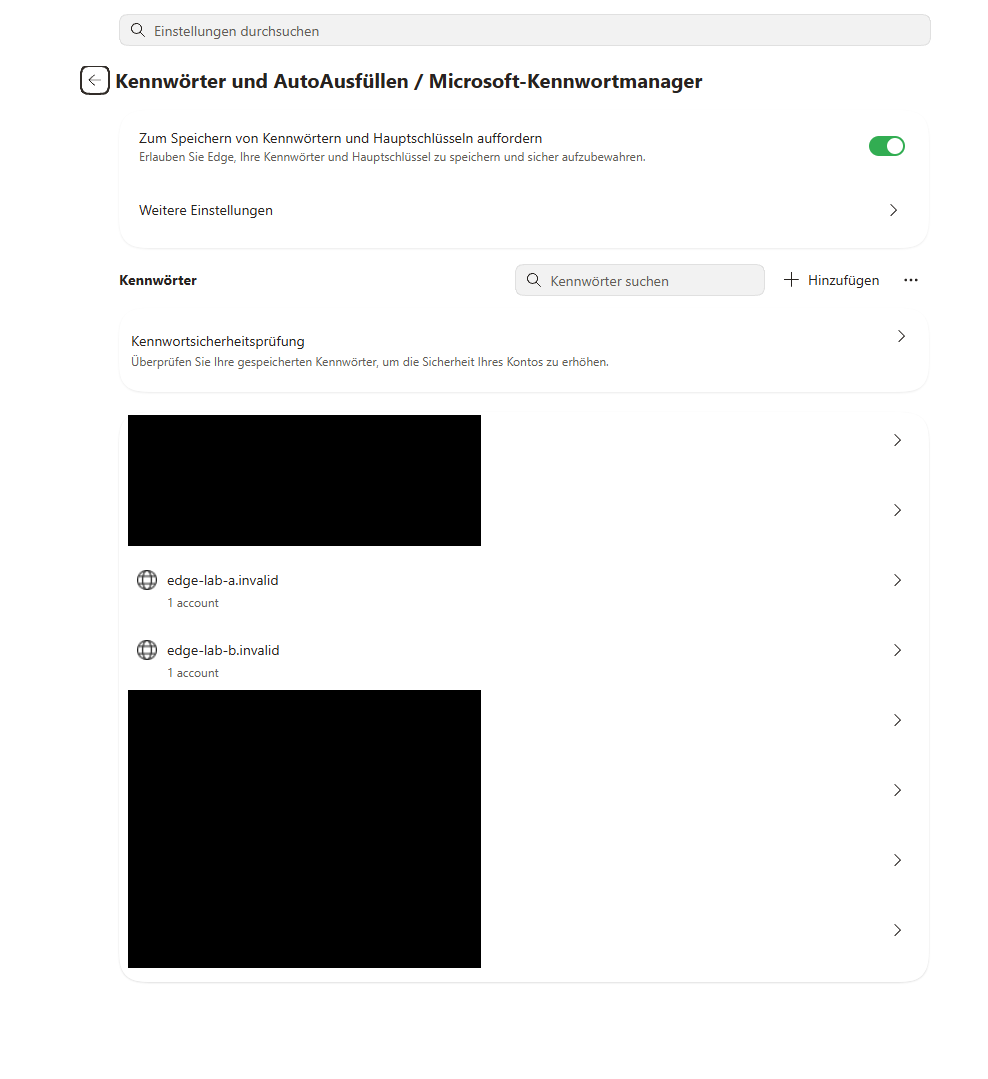
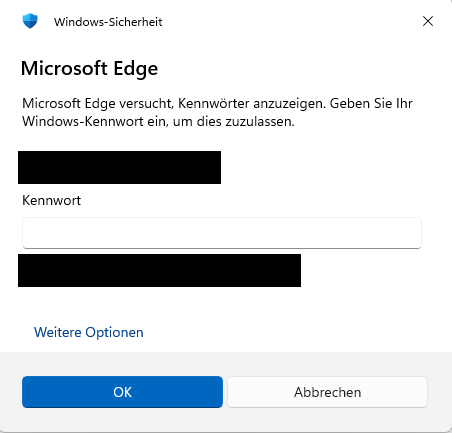
S01 / N02 · Password overview. A and B appear as separate entries. The user reported that the list was visible without a Windows prompt. Both test passwords were already confirmed in the associated memory scan.S02 / N03 · No approval. Empty input field. The user reported an open, empty, unconfirmed prompt, then confirmed cancellation without entering credentials or approving password display for N04.
The user-supplied screenshots were redacted only with fixed black rectangles covering private websites and user/computer/domain identifiers. Pixels outside those rectangles were unchanged; no generative editing was used. Originals remain separately stored locally. The detailed redaction log is retained locally with the originals.
In the current experiment on Edge 156.0.4314.58, baseline measurement N01 found no matches for the two synthetic test passwords in the readable memory regions. It began approximately 202 seconds after process launch. This single measurement is consistent with the documented startup change. Because of the delayed measurement and the read gaps described in section 06, it establishes neither immediate startup behaviour nor continuous absence of cleartext during idle operation.
Both test passwords were already present as UTF-16LE cleartext in the browser’s main process in N02, while only the password overview was open and no individual entry had been clicked. In N03, both values were read again while the Windows password prompt triggered by clicking A remained empty and unconfirmed. In N04, after cancellation without approval, both were verified again at the same six locations. Across these three positive phases, 18 exact rereads matched the expected bytes. The interactions and non-approval are documented through user statements and accompanying screenshots; the memory measurements were performed by automated local tools.
For the tested local process with read access to Edge, the visible Windows prompt therefore provided no confidentiality boundary for these already resident cleartext copies. The reader ran with Medium Integrity and a non-elevated Windows token. The finding concerns the two tested synthetic values; no remote attack, cross-account access or UAC privilege escalation was demonstrated.
Architectural assessment: In Zero Trust Lab’s assessment, minimising unnecessary cleartext copies and their lifetime remains a software vendor responsibility as part of defence in depth. For password display protected by a Windows verification prompt, making the required cleartext values available should be tied to successful approval; copies no longer needed should be discarded promptly after cancellation. This is a hardening recommendation derived from the observed behaviour. The internal decryption path and other functions such as autofill were not examined.
06
Limitations & read volumes
Read gaps: Each phase had 978,944 unevaluable bytes in the main process (956 KiB, 239 pages). There were also 243 discarded implausible API byte counts; their individual values and cause were not established.
No complete snapshot: Memory remained live during sequential reads. Skipped memory classes and potential cross-region matches limit negative statements. enumeration_finished does not guarantee complete readability.
Limited generalisation: One regular profile, one version and two synthetic values. No finding for all stored passwords, immediate startup, other accounts or other versions. Command lines alone cannot absolutely separate shared browser processes by profile.
UI provenance: User statements and screenshots, not an independent continuous recording. Capture times are not externally authenticated. Hashes check file consistency, not collection history.
Cause and privileges: The sequence documents the association with the password overview; the internal code path and absolute minimum access rights were not established.
Phase
Bytes read · process tree
Bytes read · main process
N01
4,845,170,688
743,526,400
N02
5,266,993,152
750,002,176
N03
5,217,251,328
749,088,768
N04
5,323,730,944
747,900,928
Read volumes are byte counts with comma thousands separators. The recorded gaps particularly limit the zero-result baseline. The positive byte-exact rereads are assessed separately.
07
Test values & hashes
The investigation report is available in full as a webpage. The details below supplement the measurements with the known test values and the hashes of the original measurement files. Original measurement files and unredacted screenshots remain separately stored locally.
Synthetic test values
Marker
Fabricated password value
A
ZTL_A_20261104!a5555c235d316e39
B
ZTL_B_20261104!c3ef69b01e0b4082
These values belong only to the fabricated A/B entries. Each confirmed reread contained exactly the 62 bytes of the UTF-16LE encoding below, without an additional null terminator.
These hashes identify the unchanged original files retained locally. They do not replace independent inspection of the original data or external authentication of the experiment sequence.
For repeat experiments: This page contains the test markers themselves. Do not open it in the browser profile under investigation during another memory measurement: its text could introduce those same search values into memory.
The primary sources explain the vendor position, APIs and weakness category. The local measurements originate from the separately retained investigation files.
EDGE-FOR-2026-11-04Edge 156.0.4314.58 · 64-bit4. November 2026CWE-316 · eigene Einordnung
Klartextpasswörter in Edge — bereits vor der Windows-Freigabe
Neuer A/B-Versuch im regulären Profil: Kennwortübersicht, unbestätigte Windows-Abfrage und Abbruch getrennt gemessen.
Technischer Befund & Sicherheitsbewertung
Beide synthetischen Passwörter waren bereits in der Kennwortübersicht als UTF-16LE-Klartext lesbar. Auch während der leeren, unbestätigten Windows-Abfrage und nach dem Abbrechen wurden dieselben sechs Fundstellen erneut bestätigt. Der lokale Leser lief mit Medium Integrity und einem nicht erhöhten Windows-Token.
Das ist im getesteten lokalen Bedrohungsmodell eine sicherheitsrelevante Schwäche der Speicherhandhabung: Die zusätzliche Abfrage zum Anzeigen der Kennwörter schützte bereits vorhandene Passwortbytes nicht vor dem eingesetzten lokalen Leser.
01
Umfang & Testumgebung
Untersucht wurde das eigene, autorisierte Windows-System mit dem regulären Edge-Profil Default. Von neun gespeicherten Einträgen wurden ausschließlich die zwei bekannten, erfundenen Testwerte A und B gesucht. Dieser Lauf ersetzt auf dieser Seite die frühere Messreihe vom 1. November; die Messreihen werden nicht vermischt.
Merkmal
Dokumentierte Konfiguration
Browser
Microsoft Edge 156.0.4314.58 (64-bit)
Windows
Build 26300
Profil
Default · reguläres Profil, kein ausschließliches Laborprofil
Hauptprozess
PID 25336 · erstellt 2026-11-04 00:43:21 UTC
Prozesstoken
Leser und Edge-Hauptprozess: is_elevated=false, S-1-16-8192 (Medium)
Die künstlichen Passwortwerte sind in Abschnitt 07 direkt dokumentiert. Jeder Wert umfasst 31 ASCII-Zeichen bzw. 62 Bytes in UTF-16LE. Der Benutzer bestätigte die unveränderte Übernahme. Die gespeicherten Felder der beiden Testeinträge hatten das Präfix v20 und je 62 Bytes; sie wurden nicht entschlüsselt.
02
Methode & Kontrollen
Vor jeder Phase wurden Prozessbaum, Programmdatei und Erstellungszeiten erfasst; der Scanner prüfte die Prozessidentität erneut. Die Speicherabfrage verwendete VirtualQueryEx und ReadProcessMemory mit PROCESS_QUERY_INFORMATION und PROCESS_VM_READ. Es gab keine Schreibzugriffe auf Edge, keine Prozessinjektion und keine vollständigen Speicherabbilder.
Gesucht wurden ausschließlich die bekannten A/B-Muster in UTF-8 und UTF-16LE sowie ein nicht gespeichertes Negativmuster.
Jeder Lauf bestand eine separate synthetische Positiv-, Negativ-, Blockgrenzen- und Nachlesekontrolle.
Alle 18 positiven Nachlesungen lieferten 62/62 Bytes, Fehlercode 0 und exakte Übereinstimmung mit dem erwarteten UTF-16LE-Wert.
Die Speicherlesungen wurden vom Assistenten mit lokalen Werkzeugen ausgeführt. Die Bedienung der Kennwortverwaltung, das Nichtbestätigen und das Abbrechen erfolgten durch den Benutzer und sind durch dessen Angaben und die zugehörigen Momentaufnahmen dokumentiert. Eine erfolgreiche Freigabe wurde weder angegeben noch als Voraussetzung verwendet.
03
Messreihe N01–N04
Alle Messungen: 4. November 2026, UTC. MEZ = UTC + 1 Stunde. A/B zählt exakt bestätigte UTF-16LE-Fundstellen im Hauptprozess, keine bloßen Suchkandidaten.
Phase
Zustand
Messfenster UTC
Prozesse
A
B
N01
Nach Neustart · neuer Tab
00:46:42–00:46:50
9
0
0
N02
Kennwortübersicht geöffnet
00:48:55–00:49:02
10
3
3
N03
Nur A angeklickt · Windows-Abfrage leer und unbestätigt
00:50:29–00:50:36
10
3
3
N04
Windows-Abfrage abgebrochen · keine Freigabe
00:51:44–00:51:51
10
3
3
N01 · Ausgangsmessung
Keine Treffer in den auswertbaren Regionen. Beginn erst rund 202 Sekunden nach Prozessstart; dieser Punkt belegt nicht das unmittelbare Startverhalten.
N02–N04 · Wiederholter Klartextfund
A und B jeweils dreimal, stets an denselben sechs Adressen. Erste bis letzte positive Nachlesung: rund 169 Sekunden. Dazwischen wurde nicht kontinuierlich gemessen.
Alle positiven Fundstellen lagen im selben Browser-Hauptprozess. UTF-8-Suche und Negativkontrollen blieben ohne Treffer; in den übrigen untersuchten Edge-Prozessen wurden keine A/B-Muster gefunden.
Zeitangaben sind auf ganze Sekunden gerundet. Die unveränderten Originalmessungen werden lokal aufbewahrt.
04
Anonymisierte Belegbilder
S01 / N02 · Kennwortübersicht. A und B sind getrennt sichtbar. Benutzerangabe: „Die Kennwortliste ist sichtbar, ohne Windows-Abfrage.“ Die zugehörige Messung bestätigte bereits beide Testpasswörter.S02 / N03 · Keine Freigabe. Leeres Eingabefeld. Benutzerangabe: „Windows-Abfrage offen; Feld leer; nichts bestätigt.“ Für N04 folgte die Bestätigung: „Ja, abgebrochen; nichts eingegeben oder freigegeben.“
Die Benutzeraufnahmen wurden ausschließlich mit festen schwarzen Rechtecken anonymisiert: private Webseiten sowie Benutzer- und Computer-/Domänenbezeichnung. Pixel außerhalb der Rechtecke blieben unverändert; es gab keine generative Bearbeitung. Originale werden separat lokal aufbewahrt. Das ausführliche Schwärzungsprotokoll wird zusammen mit den Originalen lokal aufbewahrt.
Im aktuellen Versuch unter Edge 156.0.4314.58 ergab die Ausgangsmessung N01 keine Treffer für die beiden synthetischen Testpasswörter in den auswertbaren Speicherbereichen. Sie begann rund 202 Sekunden nach Prozessstart. Dieser einzelne Messpunkt ist mit der dokumentierten Startänderung vereinbar. Aufgrund des späteren Messbeginns und der in Abschnitt 06 beschriebenen Leselücken belegt er jedoch weder das unmittelbare Startverhalten noch eine durchgängige Abwesenheit von Klartext im Leerlauf.
Bereits N02 zeigte beide Testpasswörter als UTF-16LE-Klartext im Browser-Hauptprozess, während lediglich die Kennwortübersicht geöffnet war und noch kein einzelner Eintrag angeklickt worden war. In N03 wurden beide Werte erneut gelesen, während die Windows-Kennwortabfrage nach dem Klick auf A leer und unbestätigt blieb. Auch in N04, nach dem Abbrechen ohne Freigabe, wurden sie erneut an denselben sechs Fundstellen bestätigt. Insgesamt lieferten die drei positiven Messphasen 18 bytegenau übereinstimmende Nachlesungen. Die Bedienung und Nichtfreigabe sind durch Benutzerangaben und die zugehörigen Momentaufnahmen dokumentiert; die Speicherlesungen wurden automatisiert ausgeführt.
Für den eingesetzten lokalen Prozess mit Lesezugriff auf Edge bildete die sichtbare Windows-Abfrage damit keine Vertraulichkeitsgrenze für diese bereits vorhandenen Klartextkopien. Der Leser lief mit Medium Integrity und einem nicht erhöhten Windows-Token. Der Befund betrifft die beiden geprüften synthetischen Werte; ein Fernangriff, ein kontoübergreifender Zugriff oder eine UAC-Rechteerhöhung wurden nicht nachgewiesen.
Architektonische Bewertung: Aus Sicht von Zero Trust Lab bleibt die Minimierung unnötiger Klartextkopien und ihrer Lebensdauer eine Aufgabe des Softwareherstellers im Sinne zusätzlicher Schutzmaßnahmen (Defense in Depth). Für die durch eine Windows-Abfrage geschützte Kennwortanzeige sollte die Bereitstellung der dafür benötigten Klartextwerte an eine erfolgreiche Freigabe gekoppelt werden; nicht mehr benötigte Kopien sollten nach einem Abbruch zeitnah verworfen werden. Dies ist eine Härtungsempfehlung aus dem beobachteten Verhalten. Der interne Entschlüsselungspfad und andere Funktionen wie Autofill wurden nicht untersucht.
06
Aussagegrenzen & Lesemengen
Leselücken: Pro Phase 978.944 nicht auswertbare Bytes im Hauptprozess (956 KiB, 239 Seiten). Zusätzlich wurden 243 unplausible API-Byteanzahlen verworfen; Einzelwerte und Ursache sind nicht geklärt.
Keine vollständige Momentaufnahme: Der Speicher lief während der sequenziellen Abfragen weiter. Ausgelassene Speicherklassen und mögliche Treffer über Regionsgrenzen begrenzen negative Aussagen. enumeration_finished ist keine Garantie vollständiger Lesbarkeit.
Begrenzte Übertragbarkeit: Ein reguläres Profil, eine Version, zwei synthetische Werte. Kein Nachweis für alle gespeicherten Kennwörter, unmittelbaren Browserstart, andere Konten oder andere Versionen. Geteilte Browserprozesse lassen sich über die Kommandozeile allein nicht absolut nach Profilen trennen.
UI-Provenienz: Benutzerangaben und Momentaufnahmen, keine durchgängige unabhängige Videoaufzeichnung. Der tatsächliche Aufnahmezeitpunkt ist nicht extern beglaubigt. Hashes prüfen Dateikonsistenz, keine Erhebungsgeschichte.
Ursache und Rechte: Der zeitliche Zusammenhang mit der Kennwortübersicht ist dokumentiert; der interne Codepfad und die absolut minimalen Zugriffsrechte wurden nicht ermittelt.
Phase
Gelesene Bytes · Prozessbaum
Gelesene Bytes · Hauptprozess
N01
4,845,170,688
743,526,400
N02
5,266,993,152
750,002,176
N03
5,217,251,328
749,088,768
N04
5,323,730,944
747,900,928
Lesemengen sind Bytezahlen; Kommas in dieser Tabelle trennen Tausendergruppen. Die dokumentierten Lücken begrenzen insbesondere die Nullmessung. Die positiven bytegenauen Nachlesungen werden separat ausgewertet.
07
Testwerte & Prüfsummen
Der Untersuchungsbericht ist vollständig als Webseite lesbar. Die folgenden Angaben ergänzen die Messreihe um die bekannten Testwerte und die Prüfsummen der Originalmessdateien. Originalmessdateien und ungeschwärzte Aufnahmen werden separat lokal aufbewahrt.
Synthetische Testwerte
Marker
Erfundener Passwortwert
A
ZTL_A_20261104!a5555c235d316e39
B
ZTL_B_20261104!c3ef69b01e0b4082
Diese Werte gehören ausschließlich zu den erfundenen A/B-Einträgen. Die bestätigten Nachlesungen umfassten jeweils genau die 62 Bytes der nachfolgenden UTF-16LE-Codierung, ohne zusätzlichen Nullterminator.
Diese Prüfsummen identifizieren die lokal aufbewahrten unveränderten Originaldateien. Sie ersetzen keine unabhängige Untersuchung der Originaldaten und keine externe Beglaubigung des Versuchsablaufs.
Für Wiederholungen: Diese Seite enthält die Testmarker selbst. Während einer erneuten Speichermessung darf sie nicht im untersuchten Browserprofil geöffnet sein, da ihr Text dieselben Suchwerte in den Speicher bringen kann.
Die Primärquellen erläutern Herstellerposition, APIs und Schwächenkategorie. Die lokalen Messwerte stammen aus den separat aufbewahrten Untersuchungsdateien.